Most maintenance advice for these units is about the months they spend in a cupboard. That’s covered but it isn’t where the wear actually happens.
The wear happens while you’re using it. Dust drawn through the vents during an outage, salt air at the ports, a cable that gets yanked out sideways one too many times, and the habits that quietly cost you cycle life. Learning how to maintain a BLUETTI portable power station properly is mostly about those things, and almost all of them take minutes.
How to Maintain a BLUETTI Portable Power Station
The short answer
Keep the vents clear and the unit cool, look after the cables and ports, avoid running it to empty when you don’t need to, and check the firmware occasionally.
That’s the whole job during ownership. Off-season storage is a separate matter, covered in our guide to storing a power station safely.
Airflow is the thing that matters most
Your unit generates heat when it works charging, discharging, or both at once. Heat is the primary factor ageing a lithium battery, and the only defence is moving air.
Which means the vents are the most important part of the case.
Where people go wrong
- Against a wall, blocking the rear or side intake
- On carpet or a rug, which blocks vents underneath
- In a cupboard with the door shut while charging
- Boxed in by everything else that got moved during a storm
- Stacked with something on top
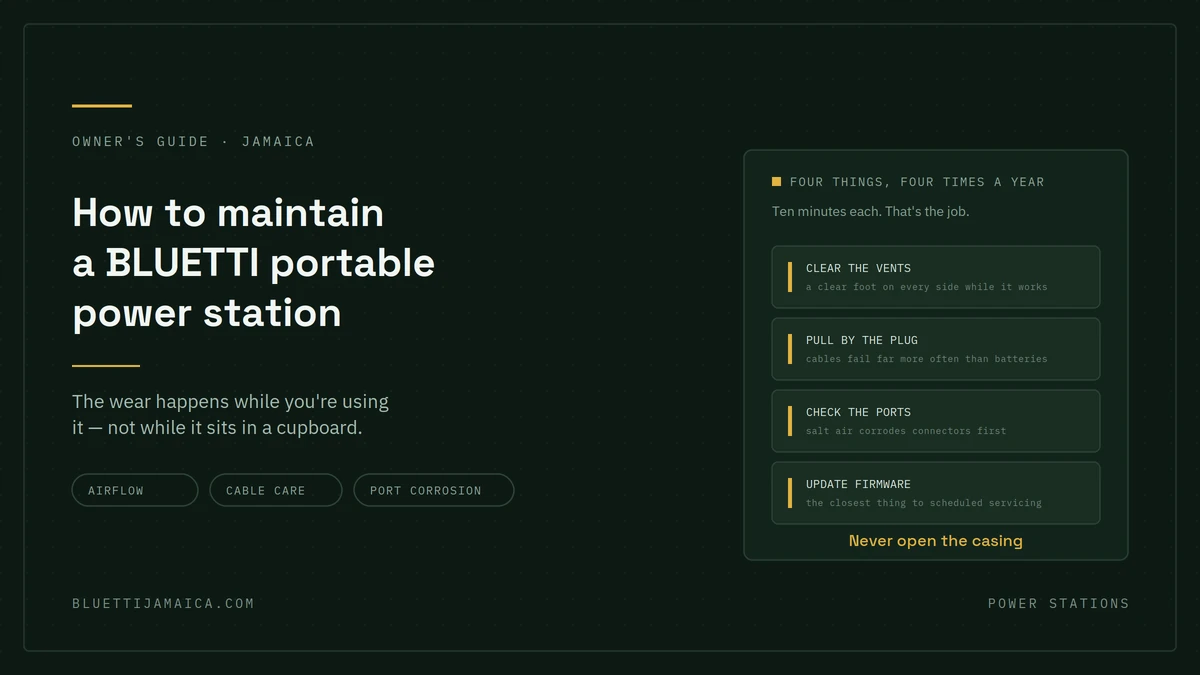
During an outage, things get moved around and a power station often ends up wherever there’s space. Give it a clear foot on every side that’s the single most valuable habit in this article.
Clearing the vents
Every few months, or after any dusty period:
- Switch off and unplug everything
- Look at each vent in good light
- Brush loose dust away with a dry soft brush
- Blow out what’s left with short bursts of compressed air, held upright and at a distance
- Wipe the casing with a barely damp cloth, never a wet one
Don’t push anything into the vents, and don’t use a vacuum directly on them.
Cables and ports: where things actually fail
Batteries rarely fail suddenly. Cables and connectors fail all the time, and they’re the most commonly replaced part of any power station setup.
The habits that kill cables
- Pulling by the cable instead of the connector the single biggest cause
- Sharp bends at the plug, where the strain relief is
- Tight coiling around the unit for storage
- Standing on them or rolling a chair over them
- Yanking sideways out of the port
A cable that’s been pulled by its cord for a year will fail at the connector eventually, and it usually happens mid-outage.
Port care in Jamaican conditions
Salt air and humidity are harder on connectors than anything else in this climate particularly within a few kilometres of the coast.
- Check ports for corrosion or discolouration every few months
- Keep dust covers on unused ports if your model has them
- Never force a connector. If it doesn’t seat easily, something’s wrong
- Keep it dry. Condensation forms when you move a cool unit into warm humid air let it acclimatise before plugging anything in
Solar connectors
If you’re using panels, the MC4 connectors deserve the same attention. Cap them when not in use, check for grit before mating them, and don’t leave them lying on the ground between uses.
Habits that extend battery life
Not maintenance exactly, but it’s what determines whether you get the full life out of the unit.
| Habit | Effect | What to do instead |
|---|---|---|
| Running to 0% routinely | Consumes cycle life faster | Recharge when convenient, not when empty |
| Leaving it plugged in permanently | Holds it at high charge, adds heat | Fine occasionally; not as a default |
| Charging in direct sun | Compounds heat from charging | Charge in shade, panel in the sun |
| Fast-charging every time | More heat than slow charging | Use standard charging when there’s no rush |
| Deep cycling daily | Faster wear | Size for shallower cycles where possible |
None of these are rules you must never break. They’re the difference between a unit that’s healthy in year six and one that isn’t.
About running it flat
You don’t need to fully discharge a lithium battery. That’s advice left over from older chemistries and it does nothing useful here.
If a display is reading oddly, an occasional full cycle can help recalibrate the gauge but as a routine practice it just uses up cycles.
Firmware, and why it’s worth checking
Manufacturers issue firmware updates that adjust charging behaviour, battery management and app functionality. It’s genuinely the closest thing to scheduled maintenance a modern power station has.
Check every few months, and particularly before hurricane season.
Two cautions: update on a full or near-full charge, and don’t interrupt it. A failed firmware update is a support call.
After heavy use
Hurricane season works these units hard. A few things worth doing once the power’s back:
- Let it cool before putting it away hours, not minutes
- Clean the vents, which will have drawn dust while running
- Check every cable and connector you used under load
- Look for physical damage if it was moved around in a hurry
- Note the runtime you got and compare it against last time
- Recharge rather than leaving it near empty
That fifth point is the useful one. If a load that used to give you ten hours now gives you seven, that’s information worth having and it’s easy to miss without a note.
What you should never do
- Open the casing. Lithium cells aren’t a DIY subject, and it voids your warranty.
- Attempt a repair, including recovering a deeply discharged battery.
- Use a damaged cable, even briefly.
- Charge it wet or with condensation on the case.
- Block the vents to make it quieter.
- Use non-approved chargers or panels outside the specified voltage range.
If you see swelling, smell anything unusual, or the case is unusually hot stop using it, move it somewhere safe away from anything flammable, and contact support. That’s not a maintenance issue.
A realistic maintenance calendar
Not a schedule so much as a rhythm:
Monthly (one minute) glance at the charge level and check nothing is blocking the vents.
Every three months (ten minutes) clean the vents, inspect cables and ports, check for firmware updates.
Before hurricane season (thirty minutes) full charge, test under a real load, check every cable and adapter, confirm solar input works, update firmware.
After each significant use cool, clean, inspect, note the runtime, recharge.
Off-season that’s storage rather than maintenance, and our storage guide covers the charge level and location questions.
FAQs
How often should I clean my power station?
Every three months, and after any dusty period or heavy use. Vents are the priority a dry brush and short bursts of compressed air, with the unit switched off and unplugged.
Can I use compressed air on the vents?
Generally yes, in short bursts, held upright and at a distance so you’re not driving dust further in. Check your model’s documentation, as the manufacturer’s instruction takes priority.
Should I run it flat occasionally?
No. Full discharge cycles aren’t necessary for lithium batteries and just consume cycle life. An occasional full cycle can help recalibrate a display that’s reading oddly, but not as routine.
Is it bad to leave it plugged in all the time?
Not dangerous, but it holds the battery at a high state of charge and generates some heat a harder duty cycle than occasional use. Fine when you need it that way; not the best default.
How do I look after the cables?
Pull by the connector, never the cord. Avoid sharp bends at the plug, don’t coil tightly, and keep them off the floor where they’ll be stepped on. Cables fail far more often than batteries.
What should I do after using it through an outage?
Let it cool, clean the vents, check cables and connectors, note the runtime you achieved, and recharge. Comparing runtime against last time is the easiest way to spot a change early.
When should I contact support instead?
Swelling, unusual smell, excessive heat, a unit that won’t hold charge, or noticeably shorter runtime than it used to give. Don’t open the casing or attempt a repair a warranty conversation costs nothing.