JPS flickers for half a second. Your PC reboots, you lose an hour of unsaved work, and the power station sitting three feet away holding two kilowatt-hours, fully charged did absolutely nothing about it.
Can a Portable Power Station Replace a UPS
That’s the frustration behind the question of whether a portable power station can replace a UPS. And the answer doesn’t depend on capacity, which is the thing everyone compares. It depends on milliseconds.
The short answer: sometimes, and transfer time decides it
A portable power station can replace a UPS for equipment that tolerates a brief interruption routers, modems, lights, fans, chargers. For a desktop PC, a NAS or a POS terminal, it depends entirely on how fast the unit switches to battery. Capacity is the easy part. The switchover gap is what decides whether your computer notices.
What a UPS actually does (it isn’t just a battery)
Most people think a UPS is a small battery in a box. It’s three things, and only one of them is the battery.
1. It switches instantly. A line-interactive UPS typically transfers to battery in single-digit milliseconds, fast enough that connected equipment never registers the interruption.
2. It conditions the power. This is the part nobody knows about, and in Jamaica it’s the part working hardest. More on it below.
3. It tells your computer to shut down. Connected by USB, a UPS signals the machine when the battery is running low so it can close files and power down cleanly rather than dropping dead mid-write.
A power station does the first thing more slowly, the second thing rarely, and the third thing not at all.
The three types of UPS
- Standby (offline): cheapest. Sits idle until power fails, then switches. Transfer times are the slowest of the three.
- Line-interactive: the common one under a desk. Adds automatic voltage regulation, and switches in a few milliseconds.
- Online double-conversion: the power always runs through the battery, so the transfer time is effectively zero. Expensive, used for servers and critical equipment.
AVR: the feature that matters most in Jamaica
Automatic voltage regulation is why a line-interactive UPS earns its place here specifically.
Jamaica’s grid problem isn’t only outages it’s what happens around them. Voltage sags when demand peaks. Brownouts dim the lights without cutting them. Surges arrive when supply comes back. AVR corrects those voltage deviations continuously, without discharging the battery at all.
Most portable power stations don’t do this. They handle the outage; they don’t correct the grid’s behaviour the rest of the time.
What a portable power station does better
The other half of the picture, and it’s substantial.
- Hours instead of minutes. A typical desk UPS gives you five to fifteen minutes. A power station runs a home office for most of a day.
- It powers real appliances. Fridge, fan, lights, a full desk setup. A UPS was never designed for that.
- It recharges from solar. This is the decisive difference, covered below.
- It moves. Desk today, kitchen tomorrow, veranda during a storm.
- Better battery chemistry. LiFePO4 cells in current units typically last thousands of cycles, against the sealed lead-acid battery in most cheap UPS units that needs replacing every few years.
UPS mode and EPS mode, explained
Many power stations offer a “UPS mode” or “EPS mode.” Here’s what it means: the unit stays plugged into the wall, your equipment plugs into the unit, and power passes through from the grid while the battery stays topped up. When the grid drops, the unit switches to its own battery.
Two things to know. Not every power station has this function check before assuming. And the marketing term “UPS mode” doesn’t guarantee UPS-grade switching speed.
The number that decides everything: transfer time
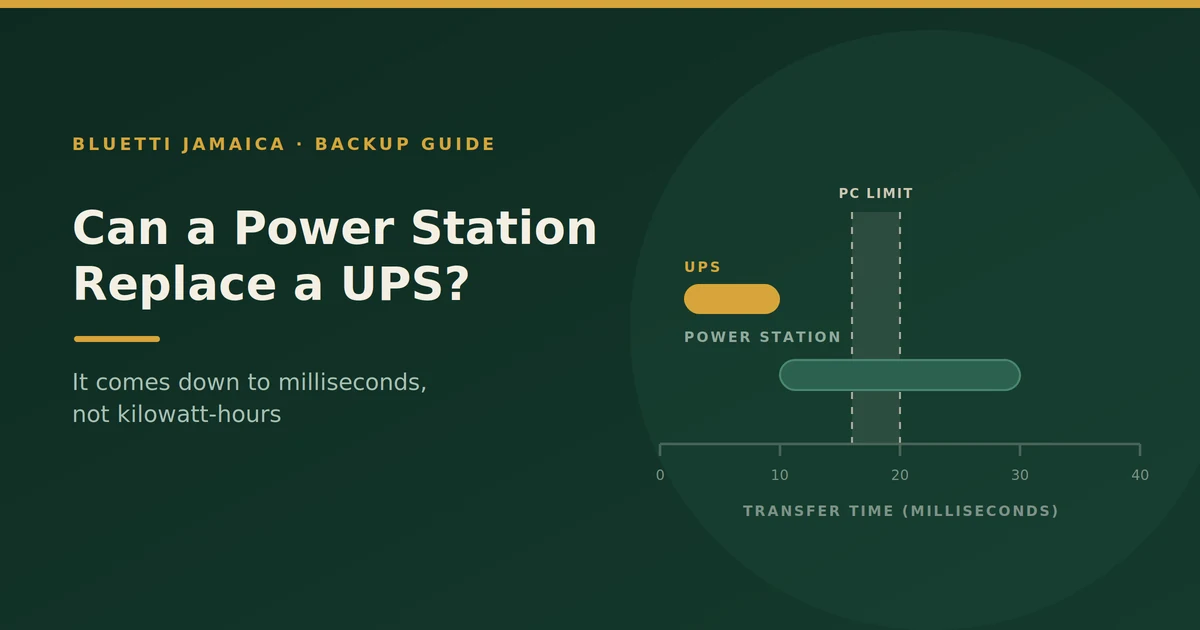
When mains power disappears, your equipment doesn’t fail immediately. A desktop power supply stores enough energy to keep running for roughly 16 to 20 milliseconds that’s the industry design target, and it’s the window everything has to fit inside.
So:
- A line-interactive UPS switches in the region of 2–10ms. Comfortably inside the window. Your PC never knows.
- A power station in UPS mode typically switches somewhere around 10–30ms depending on the model. Some are inside the window. Some aren’t. Some sit right on the edge, which means it works until the day it doesn’t.
- An online UPS has effectively no gap at all.
That single spec is the whole answer to this article’s question.
What tolerates a gap, and what doesn’t
Generally fine with 20–30ms:
- Routers, modems, mesh nodes
- LED lighting
- Fans
- Phone and laptop chargers (a laptop has its own battery anyway)
- Most small appliances
May not tolerate it:
- Desktop PCs and workstations
- NAS units and home servers where an unclean shutdown risks the data, not just the session
- Some gaming consoles
- POS terminals and business equipment
- Medical devices
If everything you’re protecting is in the first list, a power station genuinely can replace a UPS. If anything you care about is in the second, read the spec sheet before you rely on it.
Check your specific model
Transfer times vary significantly between power station models, and the figure is often buried in the manual rather than printed on the box. Don’t assume that because one unit switches fast, another from the same brand does.
Side by side
| Line-interactive UPS | Power station (UPS mode) | Both together | |
|---|---|---|---|
| Transfer time | ~2–10ms | ~10–30ms, model-dependent | Fastest path wins |
| Runtime | 5–15 minutes | Hours to a day | Hours, with clean switching |
| Voltage regulation (AVR) | Yes | Usually not | Yes |
| Safe-shutdown signalling | Yes, via USB | No | Yes |
| Powers appliances | No | Yes | Yes |
| Recharges from solar | No | Yes | Yes |
| Portable | No | Yes | Partly |
| Battery life | Lead-acid, a few years | LiFePO4, thousands of cycles | Mixed |
| Noise | Fan under load | Usually quiet | Mixed |
| Best for | Brief flickers, sensitive gear | Long outages, general loads | Home office and small business |
When a power station is the better buy
Buy the power station alone if:
- Your outages are long rather than brief which in Jamaica describes most of them
- What you’re protecting tolerates a short gap
- You also want to run a fridge, fans and lights, which no UPS will do
- You want one device that covers both a Tuesday flicker and a week after a hurricane
- You’d rather own one thing than two
For most Jamaican households, this is the right answer. The equipment that genuinely needs sub-10ms switching is usually found in offices, not living rooms.
When you still need a real UPS
Keep or buy a UPS if:
- You work on a desktop PC where losing an hour’s work costs real money
- You run a NAS or home server an unclean shutdown can corrupt data, not just interrupt it
- You operate a POS terminal or business equipment that can’t afford mid-transaction reboots
- You depend on medical equipment where an interruption isn’t acceptable at any duration
- You need automatic safe shutdown while you’re not there to do it manually
- Your area sees frequent voltage sags and brownouts, where AVR is protecting your gear every day, not just during outages
The setup most people should actually use
Here’s the honest resolution to the either/or: use both, each doing what it’s good at.
The UPS handles the milliseconds. Plug your PC, NAS or terminal into a small line-interactive UPS. It switches instantly and conditions the voltage.
The power station handles the hours. Plug the UPS itself into the power station. When the grid fails, the UPS covers the instant of transfer, then keeps running from the power station for as long as that battery lasts — hours rather than minutes.
You get clean switching and long runtime. The UPS’s tiny battery stops being the thing standing between you and a lost afternoon.
Can you plug a UPS into a power station?
Usually yes, with caveats worth respecting.
- Pure sine wave output is essential. A UPS fed with a modified sine wave may reject it and run on its own battery continuously, which defeats the purpose and wears out the UPS battery. Confirm your power station outputs pure sine wave.
- Some UPS units are fussy about frequency stability from an inverter and will switch to battery repeatedly. If yours does that, it isn’t a fault in either device they’re just not getting along.
- Watch the load. The UPS plus everything on it has to sit within the power station’s continuous output rating.
- Test it before you need it. Set it up, pull the plug deliberately, and watch what happens. Discovering an incompatibility during an actual outage is the wrong time.
Solar is what really separates them
A UPS is a bridge measured in minutes, and it has no way to refill itself. Once its battery is flat, it’s a heavy box with a dead light on it.
A power station paired with solar panels refills every day the sun comes up. During a multi-day outage the ordinary aftermath of a serious storm here that’s not a marginal advantage. It’s the entire difference between having power on day three and not.
What panel capacity keeps a home office running?
Work it from the load. A router, a laptop and a few LED lights is roughly 300–500Wh across a working day. To replace that you want panels producing at least that much on a poor-weather day, not a perfect one which in practice means a few hundred watts of panel rather than the bare minimum the sunny-day arithmetic suggests.
Grey days still charge; they charge slowly. Size for the bad week, not the good day.
FAQs
Can I use a power station as a UPS for my PC?
Only if its transfer time is fast enough. A desktop power supply rides through roughly 16–20ms, so a unit switching in 10ms is fine and one switching in 30ms may cause a reboot. Check the spec for your specific model.
What’s a good transfer time?
Under 10ms is safe for almost everything. 10–20ms is usually fine. Above 20ms, sensitive equipment like desktops and NAS units may not survive the gap.
Will a power station protect against power surges?
Not usually. Surge suppression and voltage regulation are UPS and surge-protector functions. A power station manages outages, not the grid’s bad behaviour between them.
Can I plug a UPS into a portable power station?
Generally yes, if the power station outputs a pure sine wave and the combined load stays within its continuous rating. Test the combination deliberately before relying on it some UPS units are fussy about inverter output.
How long will a power station run a desktop computer?
Depends on the draw. A typical desktop and monitor might pull 150–250W, so a 1,000Wh unit gives roughly four to six hours. A UPS would give you ten minutes.
Do I still need a UPS if I have solar?
If your sensitive equipment needs instant switching, yes solar solves duration, not milliseconds. The two address different problems.
Which is better for a small business in Jamaica?
Usually both. A UPS on the till or the server for clean switching, and a power station for the hours afterwards. Losing an afternoon of trading costs more than the second device.
The bottom line
A power station replaces a UPS for anything that tolerates a brief gap which is most of a home. It doesn’t replace one for a desktop, a NAS, a terminal or medical equipment, unless its transfer time is genuinely fast enough, and you should check that number rather than assume it.
For most people running a home office or a small business here, the sensible setup isn’t one or the other. It’s a small UPS handling the milliseconds and a power station handling the hours, with panels so the hours don’t run out.